I Built Profitable AI Systems: What Worked and What Failed
After building dozens of AI systems for B2B service businesses, here are the patterns that generate real ROI and the mistakes that waste your budget.
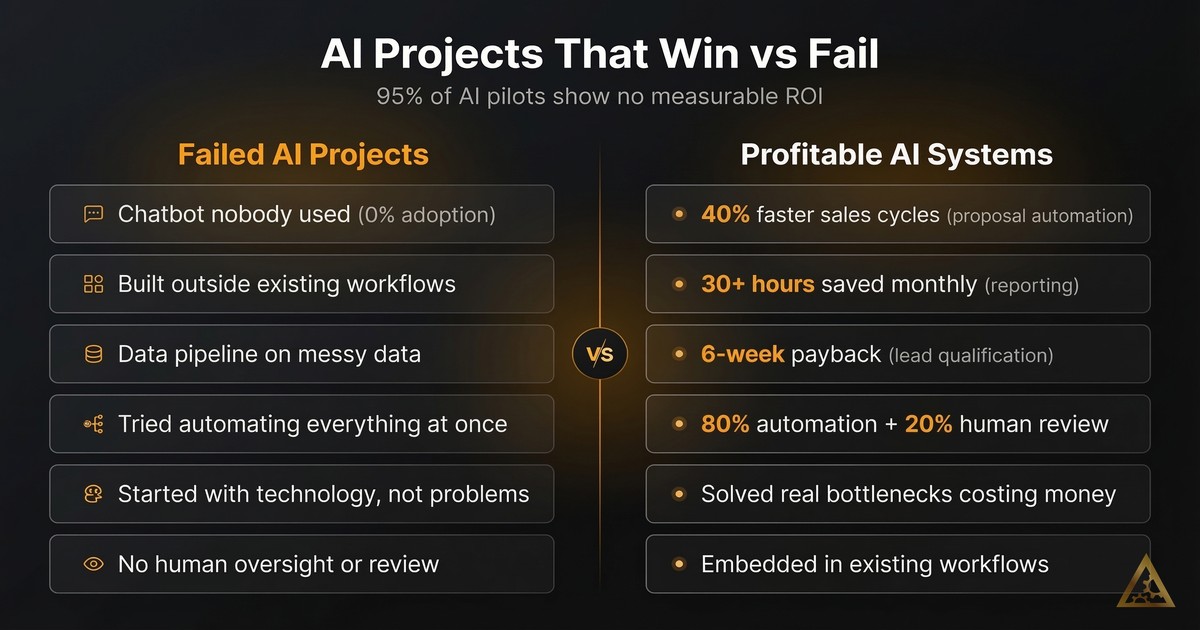
Profitable AI systems start by quantifying the cost of a specific manual bottleneck, keep a human in the loop for judgment calls, solve one problem completely before expanding, and invest in data quality before AI capability. Projects that failed skipped these steps: they were built outside existing workflows, on messy data, or tried to automate too much at once.
In the past year, we have built dozens of AI systems for B2B service businesses. Some generated real returns. Others failed. The difference between profitable AI systems and expensive shelf-ware comes down to a handful of patterns that repeat every time.
This is the honest breakdown of what worked, what did not, and why most AI projects never deliver measurable ROI.
The AI ROI Problem Nobody Talks About
Here is the uncomfortable truth: 95% of enterprise AI pilots show no measurable P&L impact, according to MIT research from 2025. That number should make anyone pause before writing a check.
It gets worse. In 2025, 42% of companies abandoned most of their AI initiatives. That is up from 17% the year before. Only 6% saw payback in under a year. Most take two to four years, if they pay back at all.
And yet the AI consulting market hit €14 billion in 2024. It is projected to reach €73 billion by 2030. Money is flowing in. Results are not flowing out.
Why? Because most AI projects start with technology and work backwards toward a problem. That is the opposite of how profitable AI systems get built.
We learned this the hard way.
Three AI Projects That Failed (And Why)
Failures teach more than successes. Here are three projects where we got it wrong.
The chatbot nobody used
A professional services firm wanted an AI chatbot for their team. The demo was impressive. It could answer questions about internal processes, pull up documentation, and summarize policies.
Six weeks after launch, usage had dropped to near zero.
The problem was simple: the chatbot answered questions nobody was asking. The team already knew where to find what they needed. The chatbot sat outside their daily workflow. Opening a separate tool to ask a question took more effort than just Slacking a colleague.
The lesson: AI that lives outside existing workflows does not get adopted. You need to embed it where people already work, not ask them to change their habits.
The data pipeline built on quicksand
A mid-sized firm hired us to extract and structure data from client documents. The AI model performed well in testing. Accuracy was above 90%.
Then we hit production.
The source data was inconsistent across departments. One team used different naming conventions than another. Date formats varied. Some fields were filled in, others left blank. The AI worked fine. The data underneath it was broken.
We spent three times the original budget cleaning and standardizing data before the pipeline could deliver reliable results.
The lesson: garbage in, garbage out remains the most reliable project killer in AI. Before you build an AI system, audit your data. If your data is messy, fix that first. The AI model is rarely the bottleneck.
The automation that tried to do everything
A services company wanted to automate their entire client onboarding process. We scoped it as a multi-step workflow: intake forms, document generation, CRM updates, task creation, email sequences, and calendar scheduling. All connected. All automated.
Scope creep killed it.
Every department wanted their edge case handled. The system grew more complex with each sprint. Integrations broke when third-party APIs changed. Testing took longer than building. By month three, the project was over budget and under-delivering.
The lesson: complex multi-step automations fail when you try to do everything at once. Start with one step. Prove it works. Then add the next. We wrote about the hidden costs of automation rules that break for exactly this reason.
Three AI Systems That Generated Real ROI
Now for the projects that worked, and the patterns behind them.
Proposal automation: 40% faster sales cycles
A B2B services firm spent 15 to 20 hours per week writing proposals. Each one was custom. Each one required pulling data from the CRM, referencing past projects, and tailoring the language to the prospect.
We built a system that automated 80% of this work. It pulled prospect data automatically, selected relevant case studies, and generated a first draft that matched the firm’s tone and structure. A senior team member reviewed and polished each proposal in about 20 minutes instead of two hours.
Results:
- Sales cycle time dropped by 40%
- 15 to 20 hours per week freed up for the sales team
- Proposal quality actually improved because the system enforced consistency
- The firm closed more deals simply because they could respond faster
The ROI was clear within the first month. The system paid for itself many times over.
Why did this work? Three reasons. First, it solved a real bottleneck that cost real money. Second, it kept a human in the loop for the final review. Third, it fit directly into the existing sales workflow.
Lead qualification: paid for itself in six weeks
A growing consultancy had a pipeline problem. Plenty of inbound leads, but qualifying them took hours of manual research. Their sales team was spending more time researching prospects than actually selling.
We built a lead enrichment pipeline. When a new lead came in, the system automatically pulled company data, financial information, recent news, and social signals. It scored leads based on fit criteria the client defined. The first 80% of research happened automatically. A human reviewed the last 20%.
Results:
- Lead qualification time dropped from 45 minutes to under 5 minutes per lead
- Sales team focused only on high-fit prospects
- Pipeline velocity increased significantly
- The system paid for itself in six weeks
This is the pattern we see over and over: automate the research, keep humans on the decisions. AI is excellent at gathering and structuring information. Humans are better at judging nuance and building relationships.
Financial reporting: 30+ hours saved per month
A services firm tracked their finances across three systems: a CRM, a project management tool, and invoicing software. Every month, someone spent a full week pulling data from each system, reconciling numbers, and building reports.
We connected all three systems and automated the reporting pipeline. Data flowed from each source into a unified dashboard. Reports generated automatically. Discrepancies flagged themselves instead of hiding in spreadsheets.
Results:
- 30+ hours per month saved on manual reporting
- Reports available in real-time instead of monthly
- Errors dropped because humans were no longer copying data between systems
- Leadership made faster decisions with current numbers
The key insight: this was not a flashy AI project. It was plumbing. But plumbing that saves 30 hours a month at senior staff rates delivers serious ROI.
The Patterns Behind Profitable AI Implementation
After building all of these systems, the patterns are consistent. Here is what separates AI projects that generate ROI from the ones that get abandoned.
Start with the cost, not the technology
Every successful project started by calculating the current cost of doing things manually. Hours spent, error rates, opportunity costs, and delays. If you cannot put a number on the problem, you cannot measure whether your solution works.
Only 29% of executives can confidently measure AI ROI. That is because they started with technology and never defined what success looks like in business terms.
Before you build anything, answer this: what does this cost us today, and what will it cost after automation? If the gap is not significant, the project is not worth pursuing.
Keep humans in the loop (for now)
Every system that worked used a human-in-the-loop model. AI handled the heavy lifting, typically 80% of the work. A human handled the judgment calls, the remaining 20%.
Human oversight catches errors before they reach clients. It builds trust with the team. And it lets you improve the system over time based on what the human reviewer corrects.
We have found that the difference between traditional automation and agentic workflows matters here. Simple rule-based automation can run fully unattended. AI systems that make judgment calls need human oversight, especially in the first six months.
Solve one problem completely before expanding
The onboarding project failed because it tried to solve ten problems at once. The proposal system succeeded because it solved exactly one problem very well.
Pick the highest-value bottleneck. Build a system that eliminates it. Prove the ROI. Then use that success to fund the next project.
Simple automations typically show positive ROI in six to nine months. More strategic AI initiatives take two to three years. Start with the quick wins to build momentum and budget for the longer plays.
Invest in data quality before AI capability
Vendor partnerships succeed about 67% of the time, compared to roughly 33% for purely internal builds. One reason: good vendors refuse to build on bad data. They will tell you to clean your data first, even if it delays the project.
If your CRM has inconsistent entries, if your documents use different formats across teams, or if your financial data lives in spreadsheets with manual formulas, fix that first. The best AI model in the world cannot compensate for broken inputs.
How to Measure AI ROI Without Guessing
Measuring AI automation ROI does not require complex frameworks. Track three things.
Time saved. Measure hours per week before and after. Multiply by the fully loaded cost of the people doing that work. This is your direct savings.
Error reduction. Count mistakes, rework, and client complaints before and after. Each error has a cost, whether it is rework time, refunds, or reputation damage.
Speed improvement. Measure cycle times. How long does a proposal take? How fast do leads get qualified? How quickly do reports get generated? Faster cycles mean more throughput with the same team.
Add these three numbers together. Compare them to what you spent building and maintaining the system. That is your ROI.
For the projects we built that worked, the numbers looked like this:
- Proposal automation: roughly €3,000 per month in time savings against a one-time build cost
- Lead qualification: paid back the full investment in six weeks
- Financial reporting: roughly €4,000 per month in time savings, plus faster decision-making that is harder to quantify but clearly valuable
What to Do Before Your First AI Project
If you are considering AI for your business, here is the practical starting point.
Audit your bottlenecks. Where does your team spend the most time on repetitive, structured work? That is your first target.
Quantify the cost. Put a euro figure on the problem. Hours times hourly rates, plus error costs, plus opportunity costs from delays.
Check your data. Is the information your AI system would need clean, consistent, and accessible? If not, budget for data cleanup first.
Start small. Pick one process. Build one solution. Prove it works. Then scale.
Keep humans involved. Plan for human review in your workflow. Your team will trust the system faster, and you will catch problems before they compound.
The approach separates companies that get real returns from AI from those that waste their budget. Start with a clear problem, clean data, and realistic expectations. Build from there.
If you want help identifying where AI can deliver the highest ROI in your business, take our AI Readiness Assessment. It takes five minutes and gives you a clear picture of where to start.
Frequently asked questions
Why do most AI pilots fail to show measurable ROI?
Most AI projects start with the technology and work backwards toward a problem, instead of starting with a quantified business cost. MIT research cited in the post found 95% of enterprise AI pilots show no measurable P&L impact, and 42% of companies abandoned most of their AI initiatives in 2025.
What made the successful AI projects different from the failed ones?
Successful projects solved a real, quantified bottleneck, kept a human in the loop for the final 20% of judgment calls, and fit directly into the existing workflow rather than requiring people to change habits. Failed projects skipped one of these, such as the chatbot that lived outside the team's daily workflow or the onboarding automation that tried to solve too many problems at once.
How do you measure AI automation ROI?
Track three things: time saved (hours before and after, multiplied by fully loaded cost), error reduction (mistakes, rework, and complaints avoided), and speed improvement (faster cycle times). Add them together and compare against the cost of building and maintaining the system.

Thom Hordijk
Founder
Get posts like this in your inbox every week
Weekly insights on AI and automation for B2B service businesses. No hype, just what works.
Related Articles
View all articles
How to Build a Marketing Intelligence System with AI
Learn how to build an AI marketing intelligence system that discovers content ideas, writes drafts, generates images, and tracks performance automatically.

Why 40% of AI Agent Projects Fail (And How to Avoid It)
Most AI agent projects fail because of planning mistakes, not the AI itself. Use this 10-point checklist to avoid the five most common failure patterns.

88% Use AI, But Most Stay Stuck in Pilot Phase
88% of businesses use AI. Most never get past the pilot stage. Here are the four failure patterns that keep companies stuck and how to escape them.